Thursday, January 25, 2018

Calling External API from Salesforce


Before writting long stories I would like to define the scope of the article and it's target audience. The last article was an overview of Integration using the two protocols and in this article I am gonna focus on an simple example how to create http callouts in Apex

The recipe requires
1. End point URL
2. Add the end poit URL in the remote site settings
3. Write an HTTP callout class
The end point URL iam gonna use here is Yahoo weather API one word condition for a city. In this case, I take Account's billing city and display the current contion of the billing city in a Inline visualforce page.

The Inline visualfoce page loads and send the record id to the controller , The controller selects the record and send the city information from the Account billing address to the Endpoint helper class fetch weather.

ont forget to add remote site settings in your org to make this work.

The code is below


Apex Class
public class fetchweather{
            
            public string result = '';
          
            
    public fetchweather(string city) {
  
        Http http = new Http();
        HttpRequest request = new HttpRequest();
        string endpoint  = 'https://query.yahooapis.com/v1/public/yql?q=';
        String encodedURL = EncodingUtil.urlEncode('select item.condition.text from weather.forecast where woeid in (select woeid from geo.places(1) where text="'+city+'")', 'UTF-8');
        string endpointurl = endpoint  + encodedURL + '&format=json&env=store%3A%2F%2Fdatatables.org%2Falltableswithkeys' ;
        System.debug(endpointurl+'++++');
        request.setEndpoint(endpointurl );
        request.setMethod('GET');
        HttpResponse response = http.send(request);
        System.debug(response.getBody());
        JSONParser parser = JSON.createParser(response.getBody());
        Map<String, Object> results = (Map<String, Object>)JSON.deserializeUntyped(response.getbody());
          system.debug('results ::'+ results );
          List<Object> lstforecast = (List<Object>)results.get('forecast');
           system.debug('lstforecast ::'+ lstforecast );
       while (parser.nextToken() != null) {
        if ((parser.getCurrentToken() == JSONToken.FIELD_NAME) && (parser.getText() == 'text') ){
         parser.nextToken();
         result += 'The weather condition for '+ city+' is ' + parser.getText();
       }
       
       }
         //result = response.getbody();
     // return null; 
    }
}

VusualForce
==========
<apex:page standardController="Account" extensions="searchAccounts" showHeader="false" sidebar="false" >
<apex:form >
 <apex:pageBlock >
 <apex:pageBlockSection columns="1" >
 </apex:pageBlockSection>
 </apex:pageBlock> 
<span id="theText" style="font-style:italic">{!result} </span>
</apex:form>
</apex:page>

Extension
==========

global class searchAccounts {
    //Defining a standard controller
     public ApexPages.StandardController controller {get; set;}
     global string result {get;set;}
     public Account a;
    
    
    //Defining a standard controller
public searchAccounts(ApexPages.StandardController controller) {
this.controller = controller;
this.a = (Account)controller.getRecord();
system.debug('aaaaa'+a);
account acc = [select id,Account.BillingCity from account where id =:a.id];
fetchweather fw = new fetchweather(acc.BillingCity );
result = fw.result;
    }
       ///////


}

How to disable a row when Input checkbox is unchecked?

usually in Visualforce if we use Input check box when can re-render the page using ajax calls but the challenge occurs if we use the repeat tags with input field (Checkbox) Component

Here is a simple java script code which will do the job.

<script>  
function confirmDisbaled(ifchecked, id1 ,id2)
    {   
        //alert("Unchecking will reset the values to Zero.");
        document.getElementById(id1).disabled = !ifchecked;    
        document.getElementById(id2).disabled = !ifchecked; 
        document.getElementById(id1).value = 0; 
        document.getElementById(id2).value = 0; 
             
    } 
</script>


and the Visualforce page should be something like this


<apex:commandButton value="Select Products" action="{!editAll}"   rendered="{!isEdit == false}"/>
            <apex:outputPanel rendered="{!isEdit}">
                <apex:commandLink action="{!saveProducts}" styleClass="btn" style="text-decoration:none;padding:4px;" value="Save Products" target="_top"/>
                
                <apex:commandLink action="{!Cancel}" value="Cancel" target="_top" styleClass="btn" style="text-decoration:none;padding:4px;" />
                
                <apex:pageBlockTable value="{!selProdList}" var="opp" id="opp_table" styleclass="slds-table slds-table_bordered slds-table_cell-buffer">
                    <apex:column headerValue="Selected?" styleclass="slds-text-title_caps">
                        <apex:inputField value="{!opp.IsSelected__c}" styleclass="slds-truncate" onchange="return confirmDisbaled(this.checked, '{!$Component.ecl}','{!$Component.emt}');"/>    
                    </apex:column>
                    <apex:column value="{!opp.Product_Name__c}"/>           
                    <apex:column headerValue="Credit Limit (M)" styleclass="slds-text-title_caps">
                        <apex:inputField value="{!opp.Expected_Credit_Limit__c}" styleclass="slds-truncate" id="ecl"  onkeydown="limitfieldvalue('{!$Component.ecl}',13);" onkeyup="limitfieldvalue('{!$Component.ecl}',13);"/>
                    </apex:column>
                    <apex:column headerValue="Max Tenure (Mn)" styleclass="slds-text-title_caps">
                        <apex:inputField value="{!opp.Expected_Max_Tenure__c}" id="emt" onkeydown="limitfieldvalue2('{!$Component.emt}',3);" onkeyup="limitfieldvalue2('{!$Component.emt}',3);"/>
                    </apex:column>
                </apex:pageBlockTable> 
            </apex:outputPanel>


The confirmedisabled() method is set with Inputs in the Check box field component and Id of the repective field which should be disable on clicking checkbox is passed as the input along with IfChecked Value. Changing !(Not) in the java script method will render the inverted outputs.

Monday, June 20, 2016

Salesforce Integration Simplified PART 1 - Salesforce Integration Scenarios


Hello Amigos,

I have been thinking about doing this for a very long time now I got the chance to do it. I am gonna tell you a super simplified way to integrate two systems. I dont want to stretch the article long so I will cut of the stories as much as possible and help you understand using simple illustrations.

We came across two protocols REST and SOAP

REST Vs SOAP Though both are equally powerful which one to choose ?!?

To illustrate in the layment terms

REST 

If you want to expose data without much importance to data security and you have large chunk of data to process choose REST.

REST is browser friendly since JSON is supported and its easy to understand.

REST has better performance and scalability.

SOAP

Focusses on Application logic than of Data.

It provides response in XML which I really dont like.

It is more secure than REST.

SOAP sucks :D


Image illustrates how REST works

Image illustrates how SOAP works


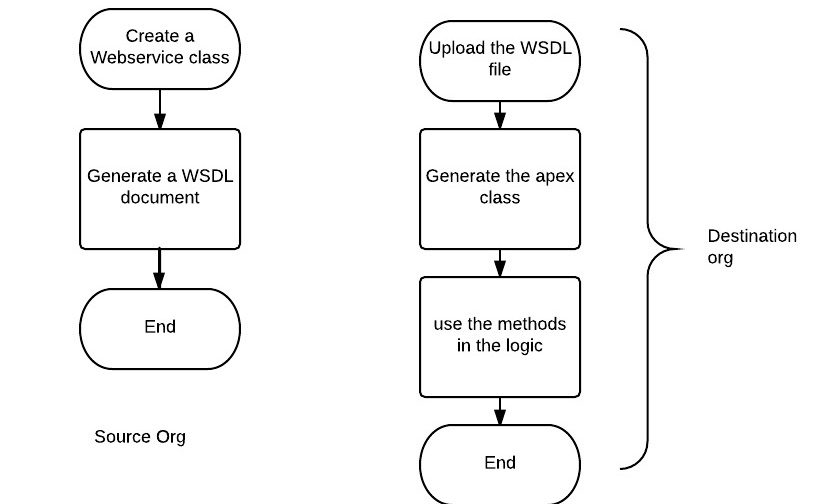
As a developer working on a destination org to integrate a legacy system using SOAP you need to ask for a WSDL file from the technical team of Org 1.


Part 2 and Part 3 will provide few use cases of using a API to perform HTTP callouts and writting test classes for mock callouts stay tuned.

References: SOAP vs REST


Authored by:          
  Nirmal Christopher,


 Salesforce.com Certified Developer, 


Monday, March 28, 2016

Reporting and Analytics in Salesforce (Part 1)


This should be a nostalgic Post. The reason I call this is as nostalgism because of the content I am posting here, Who doesn't love a quick refresh on the topics we never work for a long time. I have categorized the reporting and analytics in to two parts. Let me go through the complete road map of these series of Blogs. The part one is going to cover the power of Salesforce reporting, Report types and Formats in reports.

Reporting in Salesforce:

This is one of the powerful features in salesforce in the click and point arena is concerned. We can drill down, Group, Summarize data between different objects or same objects lets see some possibilities what the SFDC reporting can acheive


  1.  Create Reports using standard report types.
  2. Creating Custom report types.
  3. Add Formatting for the reports (Matrix, Tabular, Summary and Joined)
  4. Bucketing, Grouping, Add Formulas etc..


Create Reports using standard report types

In Salesforce the report types are built with standard objects for instance say we need to built a report with Accounts and cases or a joint report with Open and Closed Opportunities in a joint reports we use the satndard report types. Just click on the report type and start creating the reports right away.

Custom Report Types
What if the you need to create a  custom report with custom object and related records from other objects ? The best practice is to use Custom report types and use it in building report's with custom object data.

Report Formatting 
Based on the need the reports can be set in one mong the four formats listed below

Tabular - The first thing to consider about this report format is that Tabular reports are just like a spread sheet. If you want to display unlimited number of rows with a single grand total we can opt this format. Also remember we cannot create grouping in this format.

Summary - Thsi is way similar to former format but you can add row grouping, view subtotals and create charts. They can also be used as a source reports for your dashboard components.


Matrix - This is more advanced type of formatting compared to summary.  Use this type for comparing related totals, especially if you have large amounts of data to summarize and you need to compare values in several different fields, or you want to look at data by date and by product, person, or geography. Matrix reports without at least one row and one column grouping show as summary reports on the report run page.

Joined Reports -

Joined reports let you create multiple report blocks that provide different views of your data. Each block acts like a “sub-report,” with its own fields, columns, sorting, and filtering. A joined report can even contain data from different report types.

Bucketing, Grouping, Add Formulas etc..

We can create bucktes  for any fields and add this field as a sorting or a grouping bucket. Imagine we need to group account records based on record counts we can do this.

This is evolved into a robust and powerful feature in the data analytics in Salesforce.

References : https://help.salesforce.com/HTViewHelpDoc?id=reports_changing_format.htm


Authored by: Nirmal Christopher,
 Salesforce.com Certified Developer, 
Development Engineer, 


A simple Salesforce 1 Example


Thursday, February 12, 2015

Distinct keyword in salesforce


Distinct Records in Salesforce

In a table or a Object(In Salesforce), a column may contain many duplicate values; and sometimes you only want to list the different (distinct) values.
The DISTINCT keyword can be used to return only distinct (different) values.
In SQL we can write a Query to extract distinct records from table by making use of a sample Query like this 
SELECT DISTINCT column_name,column_name
FROM table_name;
But in SOQL there is no distinct keyword to do the operation and it is really boring to write out own custom logic to pick the distinct values. Please care to drop this idea in App exchange.
Eventhough Salesforce suggests the use of aggregate methods(Partial solution) to solve this I felt it's complex to implement it and it didn't work as expected. So I need to come up with a custom logic to pick distinct records from a custom object and insert it in to a unrelated second object.
/*****
***Description: The unique distinct records are picked from
***sessions aggregate object and inserted as unique records in detail reporting group object
******/


trigger InsertDistinctReportGroudId on Sessions_Aggregate__c (after insert) { 
//Collect the whole List of Session Aggregate data
        list SAlist = [select id,Reporting_Group_Name__c,SOName__c from Sessions_Aggregate__c where Reporting_Group_Name__c!=null  limit 9999];
        system.debug('SAlist '+SAlist);
//create a new set to pick the unique records and add the distinct values inside the set
        Set s1 = new Set();    
    for(Sessions_Aggregate__c c:SAlist){
//Iterate thhru the main list and assign the distinct values from a set
        s1.add(c.Reporting_Group_Name__c);
    }
        system.debug('*****'+s1.size());
//Collect the pre-Existing records in the second custom object to compare 
        list oldRGlist = [select ReportingGroupName__c from Detail_Reporting_Group__c limit 9999];
        List distinctRGnames = new List();
//Create sets to compare the existing record values of the second object with the 1st object
        Set s2 = new Set();
        Set s3 = new Set();   
    if(oldRGlist.size()>0){
    for(Detail_Reporting_Group__c S:oldRGlist){
        s2.add(S.ReportingGroupName__c);
    }
    }
    for(string s : s1){
        if(s2.contains(s)){
//if 1st object list contains any of the field values from the 2nd object the remove the repeating value from the 2nd object set.
            s2.remove(s);    
        }
    else{
//if there is no duplicates the add the 2nd obj value to the 1st object list's value 
    s3.add(s);
     }           
    }    
//Now we got all the distinct values in the set now add these value in to a master list for Insertion.
        distinctRGnames.addAll(s3);
        system.debug('+distinctRGnames+'+distinctRGnames);
          list<Detail_Reporting_Group__c> RGlist= new list<Detail_Reporting_Group__c>();
          for (integer i=0;i<distinctRGnames.size();i++){
            Detail_Reporting_Group__c DGR=new Detail_Reporting_Group__c();
            DGR.ReportingGroupName__c=distinctRGnames[i];
             RGlist.add(DGR);    
    }
//Insert The main List
    insert RGlist;


This would serve the purpose of collecting the distinct records of one object and inserting it in to another object.

Authored by: Nirmal Christopher,
 Salesforce.com Certified Developer, 
Technical Consultant, 
Global Tech & Resources, Inc. (GTR).


Creating Queues Programatically (Queue is not associated to the S object Type)

How to Create Queues Programatically in Salesforce

There will be a situation where you need to create queues programatically. Before architecting  the technical complexity there are few things taken on account 

There is two types of objects in Salesforce setup objects and  non setup objects. Set up objects doesn't allow DML operation. Please follow the link to check the list of setup and non setup objects which allow the DML operation.


you see the link Q Sobject is added in to the list. So we cannot create the Queues programatically by any direct means. But there is a workaround for this limitation.

The scenario I worked was to create new Queues based on the field value from a custom object when the record in the custom object is getting created.

So I would require a after insert trigger on the custom object to pick the name of the queue from the field value and a @future class to orchestrate the queue creation.

/*****

Description: This trigger creates queue based on the detail reporting group names

*****/

trigger CreateNewQueues on Detail_Reporting_Group__c (after insert) {     
  List newGroups = new List();
  for (Detail_Reporting_Group__c sa: Trigger.new) {
  if(sa.ReportingGroupName__c!=null){
     newGroups.add(new Group(name='RG-'+sa.ReportingGroupName__c,type='Queue'));     
     }
  }
  insert newGroups;
  Set groupids= new Map (newGroups).keySet();
  // call in future context to avoid MIXED DML conflicts
  sessionhandler.createQueue(groupIds); 


//Apex Class to handle the session to create Queues Asyncronously

public class SessionHandler{
@future
public static void createQueue(Set groupIds) {
List newQueueSobject = new List();
String clipoff;
for (Id queueId : groupIds) {
newQueueSobject.add(new QueueSObject(SobjectType='Sessions_Aggregate__c',QueueId=queueId));
}
system.debug('NEWRECORD'+newQueueSobject);
try{
insert newQueueSobject;
}
catch(exception e){
system.debug('EEEEEEEEEEEEEEEEEEE'+e);
}   
}  
}

We would require a future annotation to insert records on the setup objects asynchronously. And pass the parameters via signature groupIds to create new queue records based on the file name.


Authored by: Nirmal Christopher,
 Salesforce.com Certified Developer, 
Technical Consultant, 
Global Tech & Resources, Inc. (GTR).

Wednesday, February 11, 2015

Nested For Loop is Infected


If we have a scenario of comparing two different lists and performing a logic it works like a Odo meter of the car. The Inner loop executes first and outer loop is executed later. Consider the scenario of comparing two different lists and doing a field update based on the comparison.

Lets take two different lists

List<account>accountlist=[select id, name from account limit 9999];

List<customobject>customobjList=[select id, textvalue, lookupaccount from custom object limit 9999];

based on the text value of a field from a custom object the logic should fetch the related account name and update the look up field in the custom object.

This scenario can be achieved as follows

for(customobjList obj:customobjList){
    for(Account a:accountlist){
      obj.textvalue=a.name;
         }
}

In triggers the code needs to be properly bulkifie

The above piece of code will work fine. But the list defined inside the inner for loop will soon hit the governor limits before we can expect.

How to avoid this?

By making proper usage of Salesforce Collections

The below code will also perform the same logic but it handles the governor limits very well

list<account>acc=[select id,name from account limit 9999];
        map<string,account>accfinalmap=new map<string,account>();
    for(account acc1:acc){
        accfinalmap.put(acc1.name,acc1);
    }

    for(customobject sa3:trigger.new){
                if(accfinalmap.containskey(sa3.textvalue)){
                sa3.lookupaccount =accfinal.id;
              }
    }


By making use of the Collection times effectively we can control the governor limits at ease.


Authored by: Nirmal Christopher,
 Salesforce.com Certified Developer, 
Technical Consultant, 
Global Tech & Resources, Inc. (GTR).


Wednesday, December 10, 2014

The Ajax Toolkit for Salesforce

Why overload SOQL queries, when you can play with API calls to retrieve, create and delete data using the set of unique features provided by salesforce with AJAX toolkit.
The Ajax toolkit gives anyone familiar with Java script the ability to write the code. It is simple and lightweight. It runs on a browser, which doesn’t require execution of code from Salesforce servers. Ajax toolkit doesn’t affect test coverage. And makes development and deployment quick and easy.
Ajax toolkit does not require a single line of Apex code. Because the Ajax toolkit is making purely API calls, and as Salesforce Professional Edition doesn’t allow API calls, don’t even think about using Ajax tool kit with the Professional Edition.
The Ajax toolkit handles errors easily and its flashing feature also supports parent-child relationship queries. We can query any S object using the Ajax toolkit with the API. Consider the below code:
result = sforce.connection.query(“Select Name, Id from User”);
 records = result.getArray(“records”);for (var i=0; i< records.length; i++) {
var record = records[i];
log(record.Name + ” — ” + record.Id);
}
In the above example, “result = sforce.connection.query” is the parameter which connects to the API to query records. The Salesforce server checks the incoming API from the browser for its IP address. If the IP address is in the trusted IP range, The API is allowed to access the database, else it is bounced back.
We can also access parent child relationship in Salesforce.
//Query the parent child or child parent relationship
var result = sforce.connection.query(“SELECT c.Id, c.firstname, ” +
“c.lastname, c.leadsource, a.Id, a.name, a.industry, c.accountId ” +
“FROM Contact c, c.account a ORDER BY leadsource LIMIT 10″);var it = new sforce.QueryResultIterator(result);

With the Ajax toolkit, you can make synchronous and asynchronous call outs from Salesforce. With Ajax toolkit, you can make your life easier. Give it a try!

Authored by: Nirmal Christopher,
 Salesforce.com Certified Developer, 
Technical Consultant, 
Global Tech & Resources, Inc. (GTR).

Thursday, October 30, 2014

Building charts Using Visualforce

Building charts Using Visualforce


There are so many types of charts available we can invoke these charts with your custom data and these charts can be completely created in Visualforce page. To name a few we have Apex Pie series , Apex bar series, Apex Line Series , Apex Area series, Apex Scatter Series. 

These components are lightweight and easily adaptable in a visualforce page. Also you can use these components in standard page as an Inline visualforce page.

How to Build one ??

Build a list and use the list data in the visualforce page enclosed within the  <apex:chart>
visualforce tag. Something like this
<apex:page controller="PieChartController" title="Pie Chart">
   <apex:chart height="350" width="450" data="{!pieData}">
       <apex:pieSeries dataField="data" labelField="name"/>
       <apex:legend position="right"/>
   </apex:chart>
</apex:page>


The above code will render a pie chart something like this
pages_charting_simple_pie_chart.png
The above diagram gets the plot values from the list variable “{!pieData}” which is associated with the controller.


The value Piedata is extracted from the list of a wrapper class as a String for Months and Integer of Pie Wedge Values respectively.


Similarly we have several other chart components like apex line series which renders line graph, Apex bar series which renders Bar graph, Apex scatter series are like line series except the lines connecting the plots are invisible.


All the data to the chart series can be bought using a wrapper list. These components are really powerful,without using any Javascript remoting we can make use of these tailor made charts and graphs for you custom data in few lines of code and it makes the life of a developer so ease to live.

Authored by

Nirmal Christopher
SFDC certified Techical consultant
Global Tech & Resorces

Friday, October 24, 2014

Using Apex Param tag setting reference for the page elements


            We all know that we can communicate with pages and controllers using Getter setter methods but sometime we will be stuck in the scenario like referencing the Visualforce parent components to the controller. Lets discuss an example we have a list of records say it’s a wrapper list and below are the data types I defined inside the wrapper
  • String Name
  • String Email
  • Integer counter wrap
So the collection of whole data type is added in to a list and display this list in a Visualforce page   which will look something like this
..

On clicking the delete link the entire row gets deleted but not the data.  Let’s ask some questions to ourselves how to achieve this


1.       How the compiler knows on which “Delete  “ link is invoked inorder to get deleted?


2.       How to pass the reference parameter to check which row the user intends to delete?


These questions will be answered by Apex Parameter tag


What does this apex param tag do??
Apex parameter tag always will be the child component for the following parent tags
<apex:commandlink>
<apex>commandbutton>
<Apex:actionstatus>
<apex:actionFunction>
<apex:actionSupport>
<apex:outputtext>
Let’s get back to our example


First things first before diving deep into any technical code let me give the answers for the questions I asked above


1.        How the compiler know on which “Delete  “ link of the row the list index position should get deleted ?
In the wrapper list I have set an Integer variable which will act as an index element for each record in a list and when the user click on the delete link the param tag will pass the value to the controller. There we can identify if the record is equal to the integer value obtained from the param tag. It its operation to delete or remove the row can be applied.

2.       How to pass the reference parameter to check which row the user indents to delete?
I have set the value attribute from the integer value counter wrap


Scenario
           Let’s look at some sample code here how we did this.
In the Visualforce page


<apex:pageBlockTable value="{!wrapkeyconlist2}" var="i">    <apex:column headerValue="Action">       <apex:commandLink value="Delete" action="{!remove}" immediate="true">           <apex:param name="index" value="{!i.counterWrap}"/>         </apex:commandLink>   </apex:column> <apex:column value="{!i.keyconlist1.name}"/> <apex:column value="{!i.keyconlist1.FF__Email__c}"/> </apex:pageBlockTable>

In the controller remove method


  Integer param = Integer.valueOf(Apexpages.currentpage().getParameters().get('index'));   for(Integer i=0;i<wrapkeyconlist2.size();i++){  
if(wrapkeyconlist2[i].counterWrap == param ){  wrapkeyconlist2.remove(i); 
} 
counter--; 

Nirmal Christopher
SFDC certified force.com developer
Global Tech and Resorces

Tuesday, October 21, 2014

New upcoming Features to be considered on Dream force 2014 Platform Upgrade

Salesforce 1 Lightning


It's always a nightmare to develop UI in force.com platform until the developer knows the various UI components used. For Instance if we are developing a custom UI there is a set or predefined drag and drop feature available to create UI in IDE's provided for other platforms. Example:netbeans, Eclipse, Dream viewer etc..

But in salesforce there is no such tools available until now. But in dreamforce 14 salesforce launched a new app "Salesforce Lightning" which allows the user to create rich UI light weight components.

Now business users and developers can create hazzle free rich UI's for desktop application and salesforce1 platform. using the new app. Now it's is in beta release


Salesforce wave(analytics cloud)


In dreamforce 14 salesforce has launched a new app known as "Analyics Cloud". Like its predessors(Sales cloud,service cloud,Marketing cloud) its a new app is built natively on the salesforce  platform.

Its a licenced  feature and it's the first mobile analytics platform. The UI and the dashboard components are so rich which allows the user to use scalable,precise and rich dashboard and analytics component at the finger tip.

The UI is crystal clear and alllow the user to view the trending data in different components simultaneously. They can filter and search for the results and the real tim UI adopts the user input so dynamically like a wave. Its a WOW feature...

Follow the link to know more about the platform


Nirmal Christopher
SFDC certified force.com developer
Global Tech and Resorces